PC微信多开并为每个账号设置热键
设置快捷键
PC微信多开登录成功后,会自动注册快捷键,但第二个账号登录后,注册快捷键会因为冲突而失败。为第二个账号手动设置快捷键,等下次登录的时候依然会失败,因为这个配置不会保存。
Windows中使用RegisterHotKey注册快捷键,我尝试直接Hook这个函数,在Hook函数中尝试多次调用原函数,每次修改快捷键键值,直到RegisterHotKey返回TRUE。虽然API显示注册快捷键成功,但注册的快捷键依然无法正常使用。
于是尝试分析调用RegisterHotKey的地方,从微信程序的代码入手。
以下代码就是3.9.10.19版本微信注册快捷键的代码,先从读取快捷键配置,再调用RegisterHotKey注册。经过尝试,在读取配置之前,修改配置中的快捷键键值,可以实现快捷键注册。
1
2
3
4
5
6
7
8
9
10
11
12
13
14
15
16
17
18
19
20
21
22
23
24
25
26
27
28
29
| 00007FF8BA54A07F | 49:8D4D 08 | lea rcx,qword ptr ds:[r13+8] | [ds:[r13+08]]:TlsGetData+AAA320
00007FF8BA54A083 | E8 883BB4FF | call wechatwin.7FF8BA08DC10 |
00007FF8BA54A088 | 45:8D41 04 | lea r8d,qword ptr ds:[r9+4] |
00007FF8BA54A08C | 45:84D2 | test r10b,r10b |
00007FF8BA54A08F | 45:0F44C1 | cmove r8d,r9d |
00007FF8BA54A093 | 45:8B8D C8160000 | mov r9d,dword ptr ds:[r13+16C8] |//<---------------
00007FF8BA54A09A | 48:8BC8 | mov rcx,rax |
00007FF8BA54A09D | FF15 6D917302 | call qword ptr ds:[<RegisterHotKey>] |//RegisterHotKey
00007FF8BA54A0A3 | 8985 C0000000 | mov dword ptr ss:[rbp+C0],eax |
00007FF8BA54A0A9 | 48:897C24 50 | mov qword ptr ss:[rsp+50],rdi |
00007FF8BA54A0AE | 48:897C24 58 | mov qword ptr ss:[rsp+58],rdi |
00007FF8BA54A0B3 | 48:897C24 60 | mov qword ptr ss:[rsp+60],rdi |
00007FF8BA54A0B8 | 897C24 68 | mov dword ptr ss:[rsp+68],edi |
00007FF8BA54A0BC | C785 B8000000 01000000 | mov dword ptr ss:[rbp+B8],1 |
00007FF8BA54A0C6 | BA 65310000 | mov edx,3165 |
00007FF8BA54A0CB | 48:8D4C24 50 | lea rcx,qword ptr ss:[rsp+50] |
00007FF8BA54A0D0 | E8 AB7C5D00 | call wechatwin.7FF8BAB21D80 |
00007FF8BA54A0D5 | 48:C7C6 FFFFFFFF | mov rsi,FFFFFFFFFFFFFFFF |
00007FF8BA54A0DC | 48:8D1D C987E002 | lea rbx,qword ptr ds:[7FF8BD3528AC] |
00007FF8BA54A0E3 | 48:895D 98 | mov qword ptr ss:[rbp-68],rbx |
00007FF8BA54A0E7 | 45:85E4 | test r12d,r12d |
00007FF8BA54A0EA | 0F85 03020000 | jne wechatwin.7FF8BA54A2F3 |
00007FF8BA54A0F0 | 45:88A5 F01F0000 | mov byte ptr ds:[r13+1FF0],r12b | byte ptr ds:[r13+1FF0]:const IChannelLogWriter::`vftable'+27E908
00007FF8BA54A0F7 | 48:897C24 70 | mov qword ptr ss:[rsp+70],rdi |
00007FF8BA54A0FC | 48:897C24 78 | mov qword ptr ss:[rsp+78],rdi |
00007FF8BA54A101 | 48:897D 80 | mov qword ptr ss:[rbp-80],rdi |
00007FF8BA54A105 | 897D 88 | mov dword ptr ss:[rbp-78],edi |
00007FF8BA54A108 | C785 B8000000 03000000 | mov dword ptr ss:[rbp+B8],3 |
00007FF8BA54A112 | BA 36330000 | mov edx,3336 |
|
frida代码:
| var module = Process.findModuleByName("WeChatWin.dll")
const base = module.base
const config_hotkey_addr = base.add(0x210a093)
console.log('register hotkey:', config_hotkey_addr)
Interceptor.attach(config_hotkey_addr, {
onEnter(args) {
console.log("register hotkey call....");
var value = ptr(this.context.r13.add(0x16C8)).readUInt()
ptr(this.context.r13.add(0x16C8)).writeUInt(value + 1)
console.log('done')
}
})
|
为每个微信账号设置快捷键
如何获取每个微信进程的账号?看了下WeChatFerry 和 wxhelper的代码,于是根据 wxhelper的方案找到了3.9.10.19版本获取用户信息的call。以下是查找的流程:
3.9.5.81 获取wxid:
| 00007FFC74CB1230 | 48:83EC 28 | sub rsp,28 |
00007FFC74CB1234 | 8B0D 5ED41A03 | mov ecx,dword ptr ds:[7FFC77E5E698] |
00007FFC74CB123A | 6548:8B0425 58000000 | mov rax,qword ptr gs:[58] | rax:const IChannelLogWriter::`vftable'+97BCF0
00007FFC74CB1243 | BA 04010000 | mov edx,104 |
00007FFC74CB1248 | 48:8B0CC8 | mov rcx,qword ptr ds:[rax+rcx*8] |
00007FFC74CB124C | 8B040A | mov eax,dword ptr ds:[rdx+rcx] |
00007FFC74CB124F | 3905 A3AB2003 | cmp dword ptr ds:[7FFC77EBBDF8],eax | 00007FFC77EBBDF8:L"F耀"
00007FFC74CB1255 | 7F 0C | jg wechatwin.7FFC74CB1263 |
00007FFC74CB1257 | 48:8D05 72A32003 | lea rax,qword ptr ds:[7FFC77EBB5D0] | rax:const IChannelLogWriter::`vftable'+97BCF0
00007FFC74CB125E | 48:83C4 28 | add rsp,28 |
00007FFC74CB1262 | C3 | ret |
|
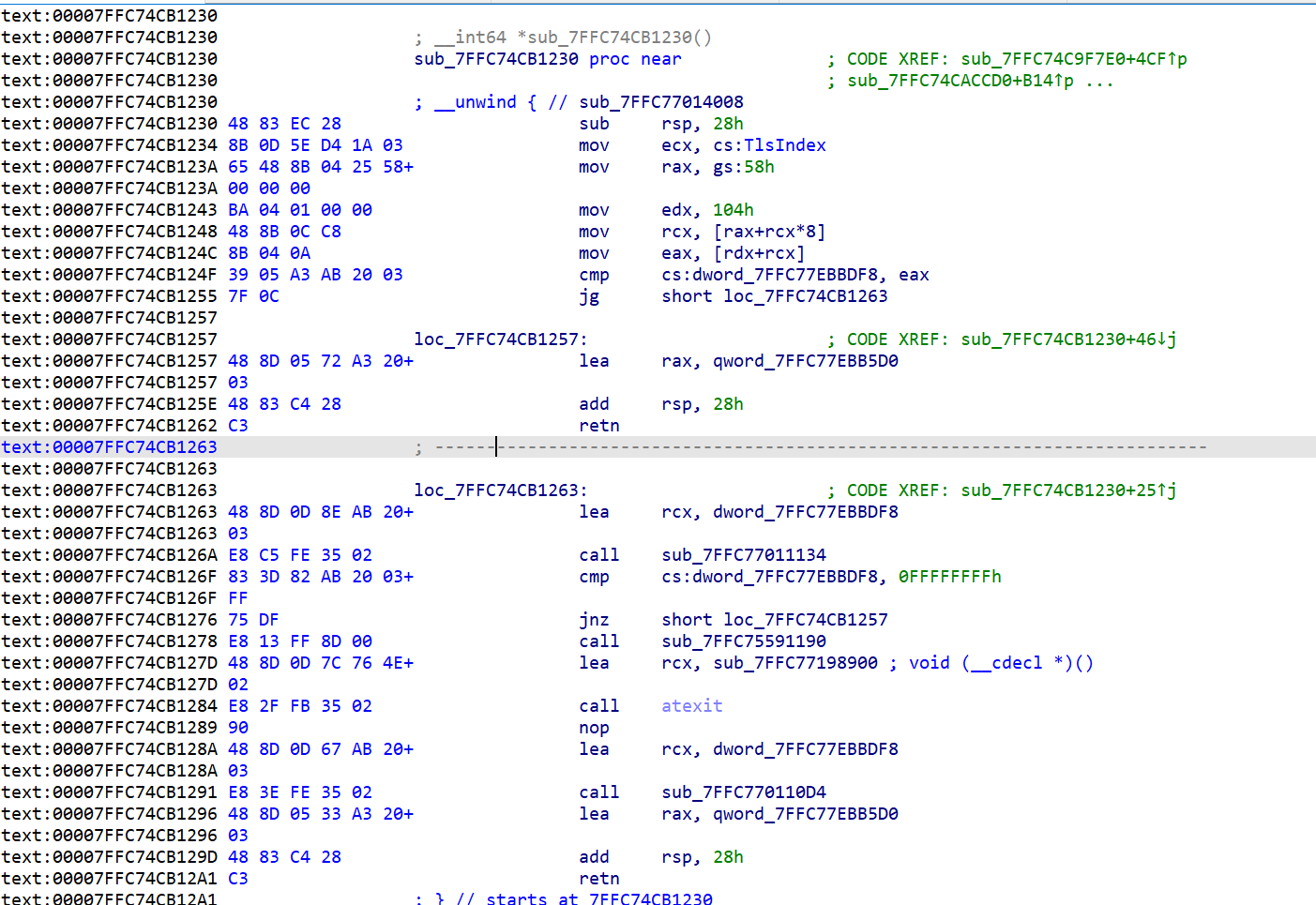
调用这个获取账户信息的函数有很多调用:
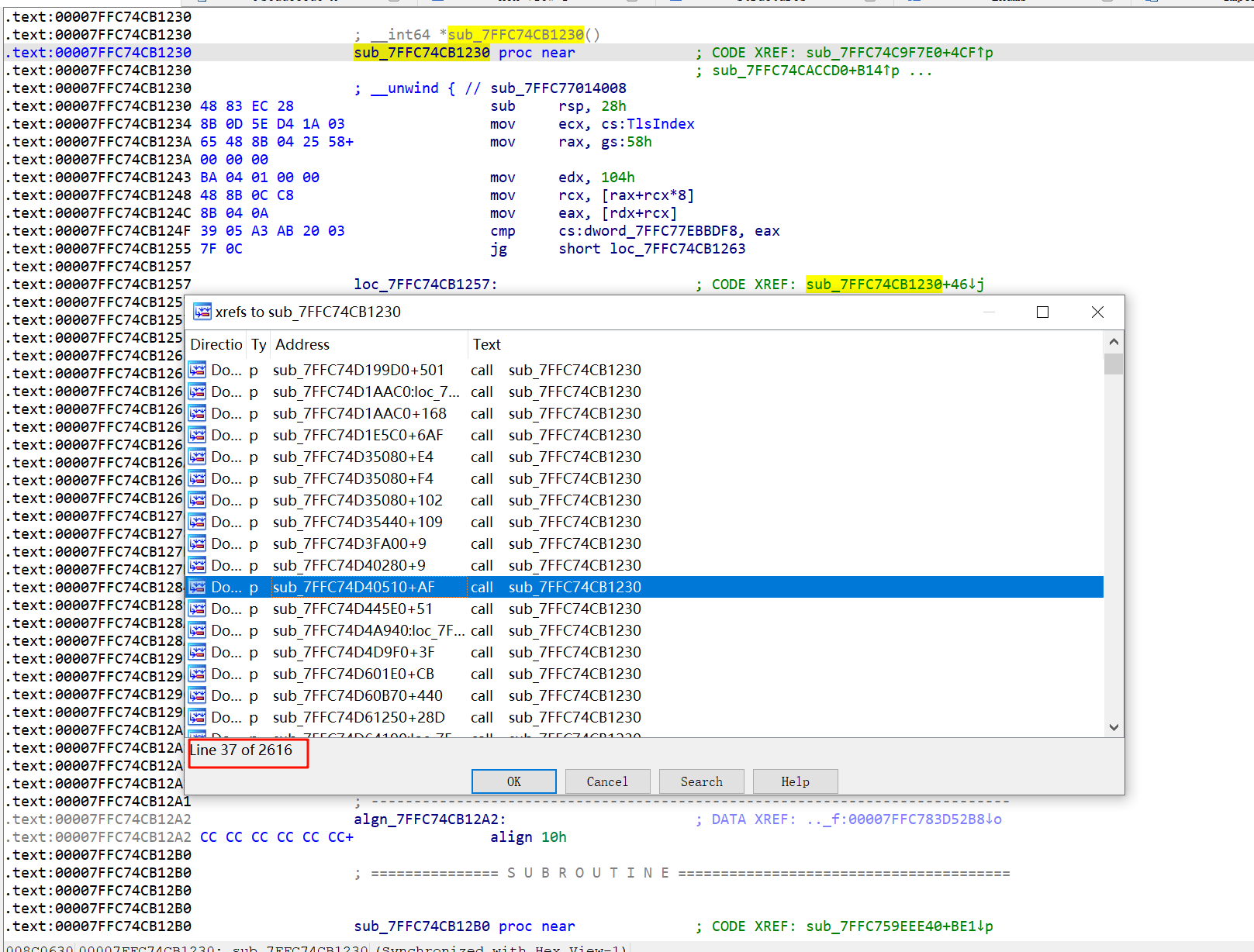
其中一个:
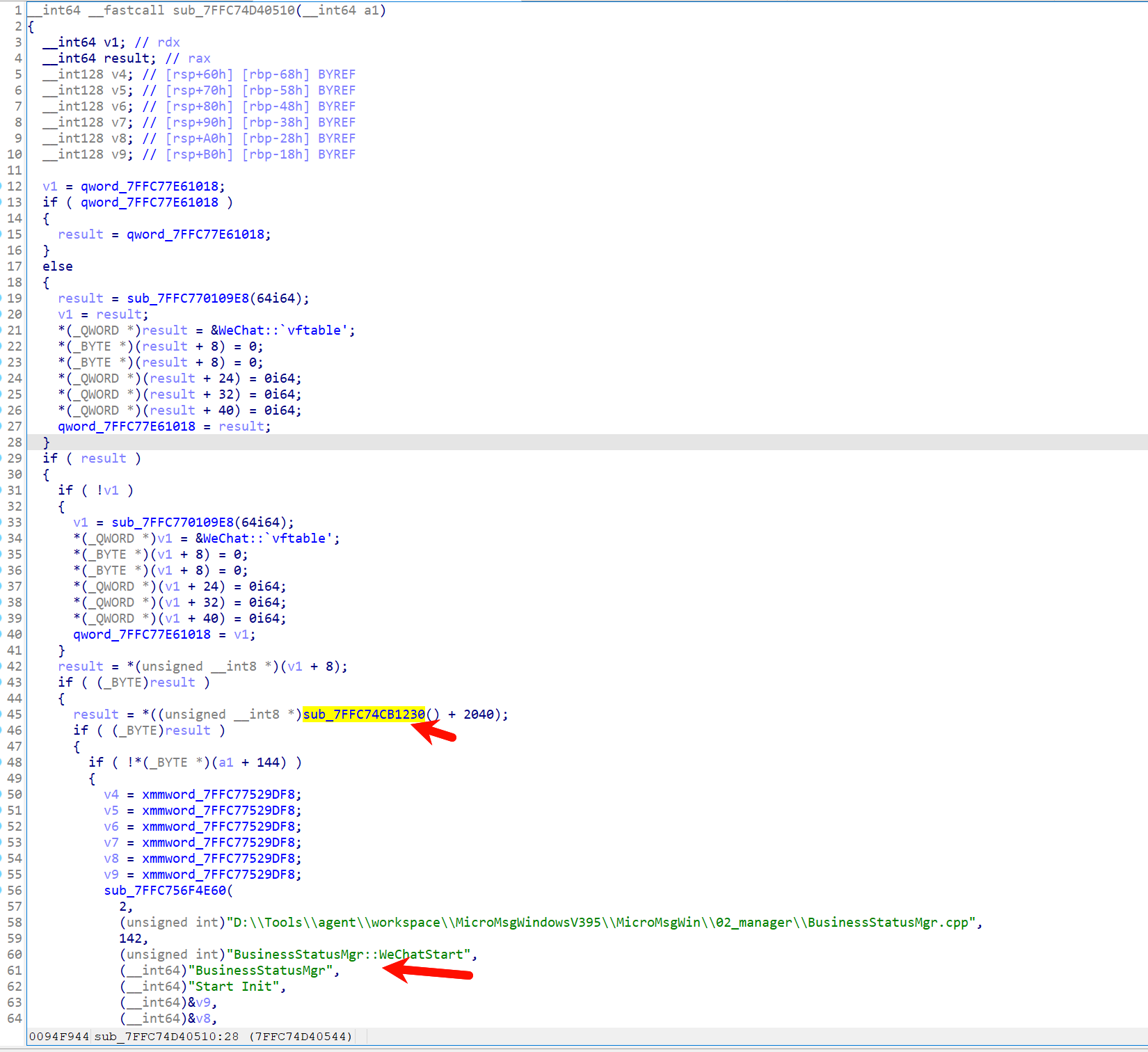
根据调用这个call的其中一个函数的字符串特征(BusinessStatusMgr),在3.9.10.19版本中找到了获取微信个人信息的call。
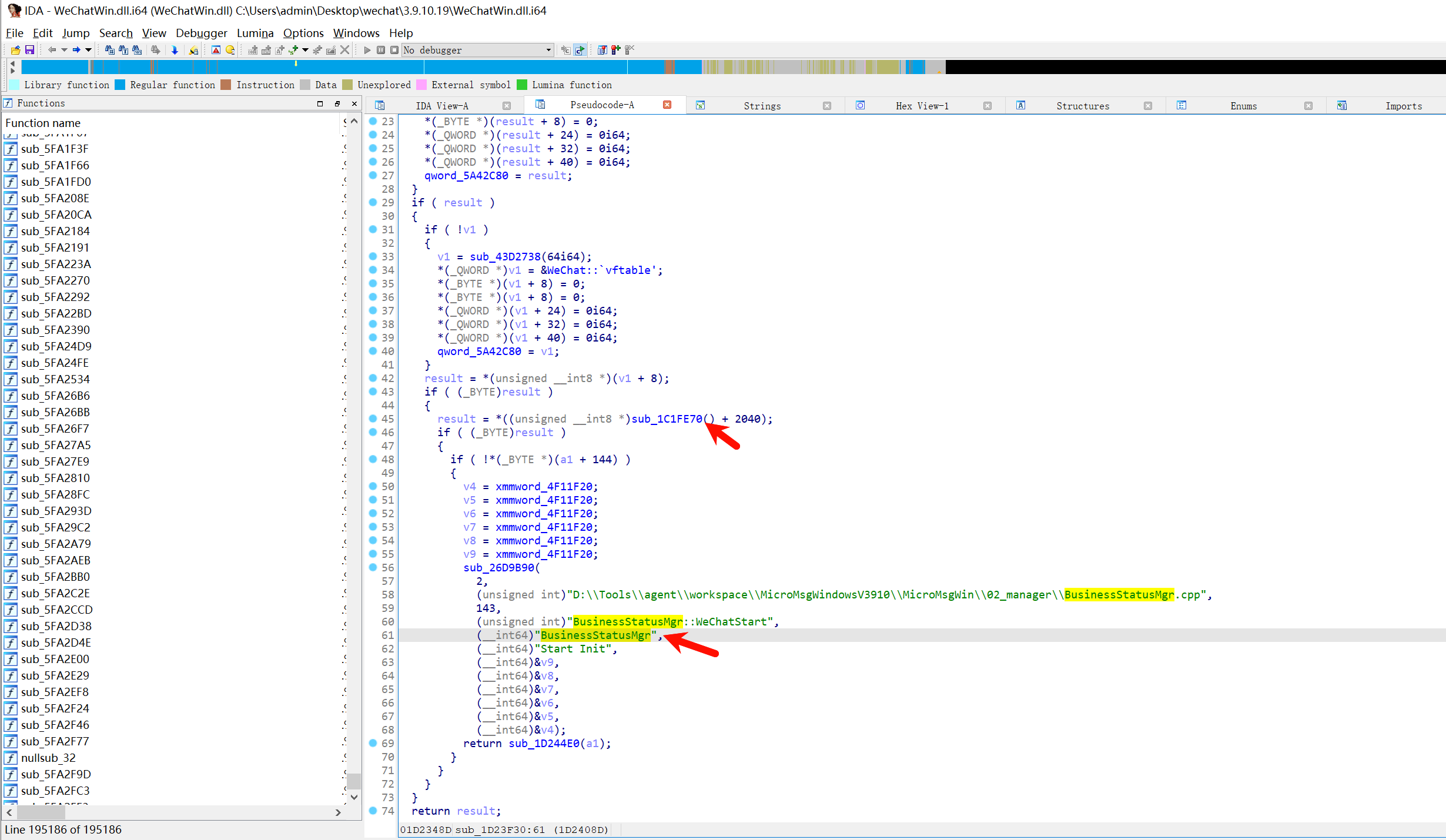
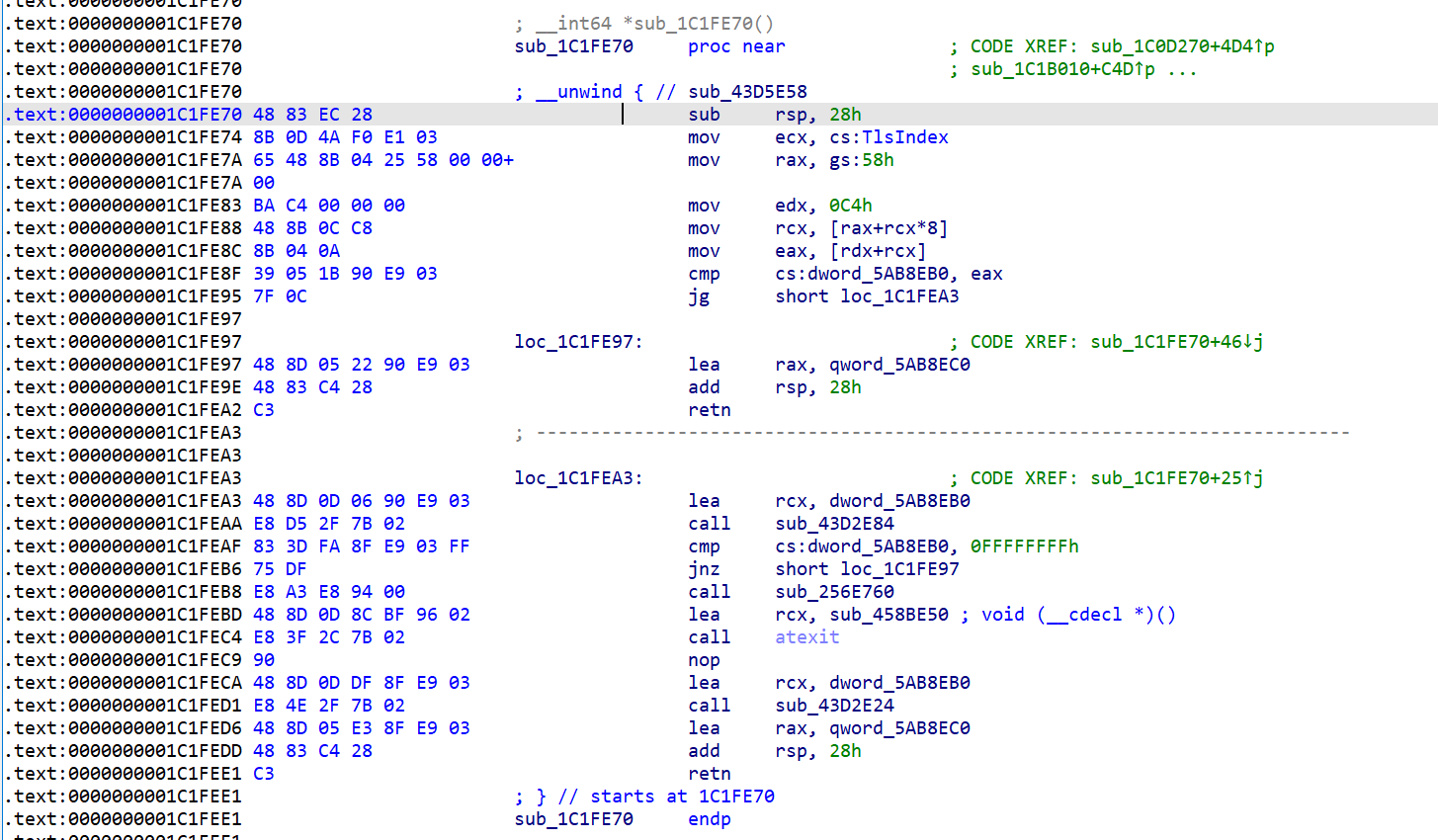
最终代码
1
2
3
4
5
6
7
8
9
10
11
12
13
14
15
16
17
18
19
20
21
22
23
24
25
26
27
28
29
30
31
32
33
34
35
36
37
38
| function get_wxid() {
var module = Process.findModuleByName("WeChatWin.dll")
const base = module.base
const user_info_func_addr = base.add(0x1C1FE70)
var funcPtr = new NativeFunction(ptr(user_info_func_addr), 'pointer', []);
var user_info = funcPtr();
var wxid = ''
if (ptr(user_info).add(0x80).add(0x18).readUInt() == 0xf) {
wxid = ptr(user_info.add(0x80)).readCString()
} else {
wxid = ptr(user_info.add(0x80)).readPointer().readCString()
}
return wxid
}
function main() {
const index_tables = {'zhigao': 0, 'wxid_k65e3dxt3ds412':1}
var module = Process.findModuleByName("WeChatWin.dll")
const base = module.base
const config_hotkey_addr = base.add(0x210a093)
console.log('register hotkey:', config_hotkey_addr)
Interceptor.attach(config_hotkey_addr, {
onEnter(args) {
console.log("register hotkey call....");
var wxid = get_wxid()
console.log('wxid: ', wxid)
var value = ptr(this.context.r13.add(0x16C8)).readUInt()
var index = index_tables[wxid]
ptr(this.context.r13.add(0x16C8)).writeUInt(value + index)
}
})
}
main();
|
使用frida启动进程并注入代码:
| pid = device.spawn(["C:/Program Files/Tencent/WeChat/WeChat.exe"])
session = device.attach(pid)
scr = open('test.js').read()
script = session.create_script(scr)
script.on("message", on_message)
script.load()
device.resume(pid)
sys.stdin.read()
|
更新-为每个微信设置托盘图标
设置托盘的API为Shell_NotifyIcon。
| BOOL Shell_NotifyIconA(
[in] DWORD dwMessage,
[in] PNOTIFYICONDATAA lpData
);
|
1
2
3
4
5
6
7
8
9
10
11
12
13
14
15
16
17
18
19
20
21
22
23
24
| typedef struct _NOTIFYICONDATAA {
DWORD cbSize;
HWND hWnd;
UINT uID;
UINT uFlags;
UINT uCallbackMessage;
HICON hIcon;
#if ...
CHAR szTip[64];
#else
CHAR szTip[128];
#endif
DWORD dwState;
DWORD dwStateMask;
CHAR szInfo[256];
union {
UINT uTimeout;
UINT uVersion;
} DUMMYUNIONNAME;
CHAR szInfoTitle[64];
DWORD dwInfoFlags;
GUID guidItem;
HICON hBalloonIcon;
} NOTIFYICONDATAA, *PNOTIFYICONDATAA;
|
思路就是Hook Shell_NotifyIcon,修改lpData指针指向的结构体中的hIcon。
HICON可以调用ExtractIcon从一个DLL或EXE文件中获取图标资源。
hook所有Shell_NotifyIcon调用后,接收到新消息时,托盘图标不会跳动,因此判断一下调用地址,过滤掉新消息提醒时的调用。
1
2
3
4
5
6
7
8
9
10
11
12
13
14
15
16
17
18
19
20
21
22
23
24
25
26
27
| var addr_Shell_NotifyIcon = Module.findExportByName(null, "Shell_NotifyIconW");
var ExtractIcon = new NativeFunction(Module.findExportByName(null, "ExtractIconA"),'pointer', ['pointer', 'pointer', 'uint']);
Interceptor.attach(addr_Shell_NotifyIcon, {
onEnter(args) {
console.log("Shell_NotifyIconW call....");
var ret_addr = ptr(this.context.rsp).readPointer()
if(String(ret_addr).indexOf('d8e') > -1){
return
}
if(wxid==null){
wxid = get_wxid()
console.log('wxid: ', wxid)
}
var index = ico_table[wxid]
if(index>0){
var x = ExtractIcon(ptr(0), Memory.allocUtf8String("C:\\tmp\\wechat\\WindowsProject3.exe"), index)
Memory.writePointer(ptr(args[1]).add(0x20), x);
}
console.log('Shell_NotifyIconW done.')
}
})
|
图标exe制作:
将图片转成ico
|
import img2img
from PIL import Image
import random
def convert(filename, output_filename):
image = Image.open(filename)
image = image.resize((256,256))
temp_filename = './temp/{}.jpg'.format(random.randint(1,100000))
image.save(temp_filename)
img = img2img.Img2img()
img.convert("jpg2ico", temp_filename, output_filename)
|
添加到Visual Studio工程
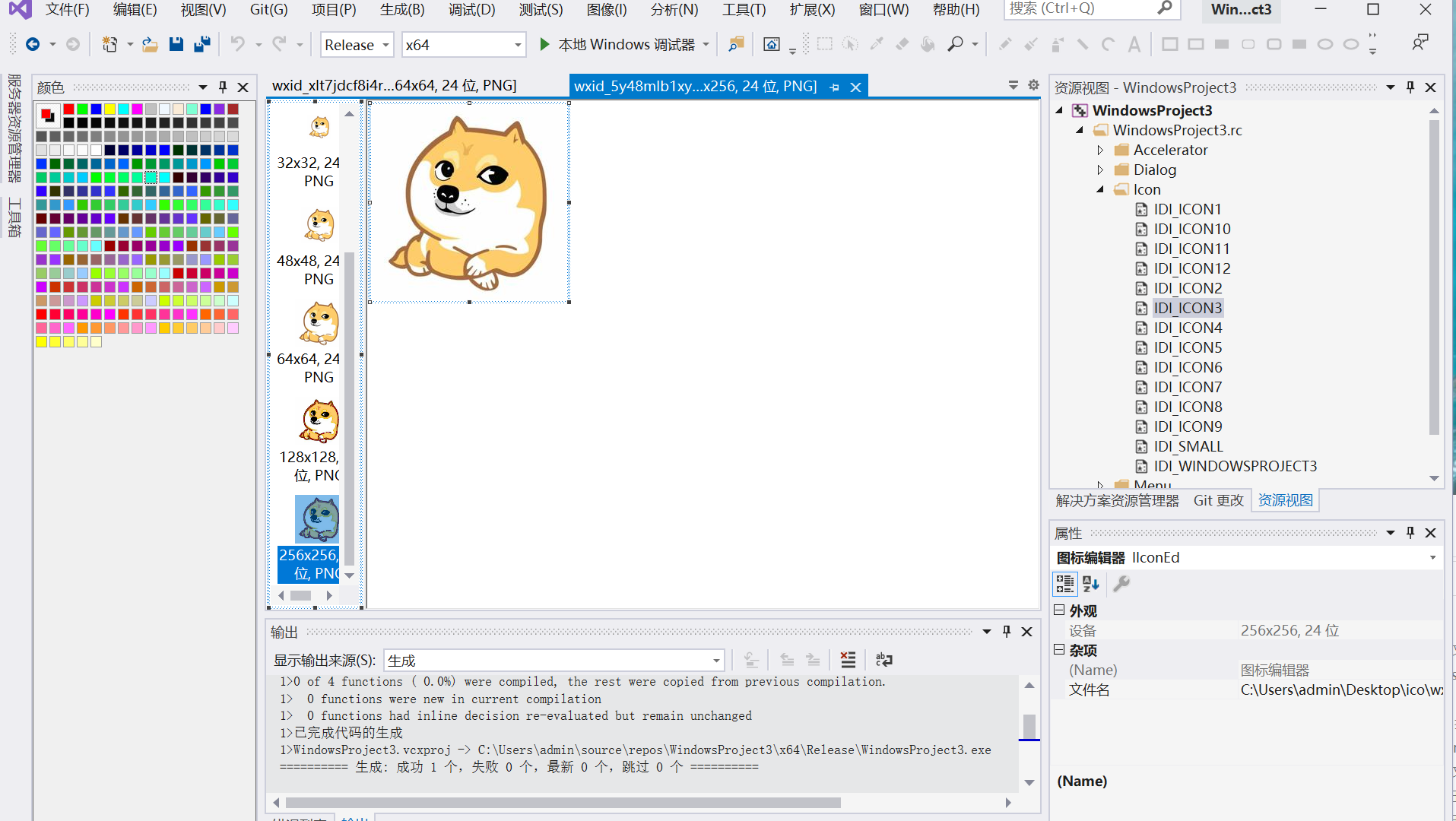
参考资料:
https://learn.microsoft.com/en-us/windows/win32/api/shellapi/nf-shellapi-shell_notifyicona
https://learn.microsoft.com/en-us/windows/win32/api/shellapi/ns-shellapi-notifyicondataa
https://learn.microsoft.com/en-us/windows/win32/api/shellapi/nf-shellapi-extracticonw
https://learn.microsoft.com/en-us/windows/win32/menurc/using-icons